3D Product Renders vs Photoshoots: Render vs Photo Compared
3D render vs photo for products: a side-by-side comparison, when CGI beats a photoshoot, when a camera still wins, and examples from my own Blender renders.
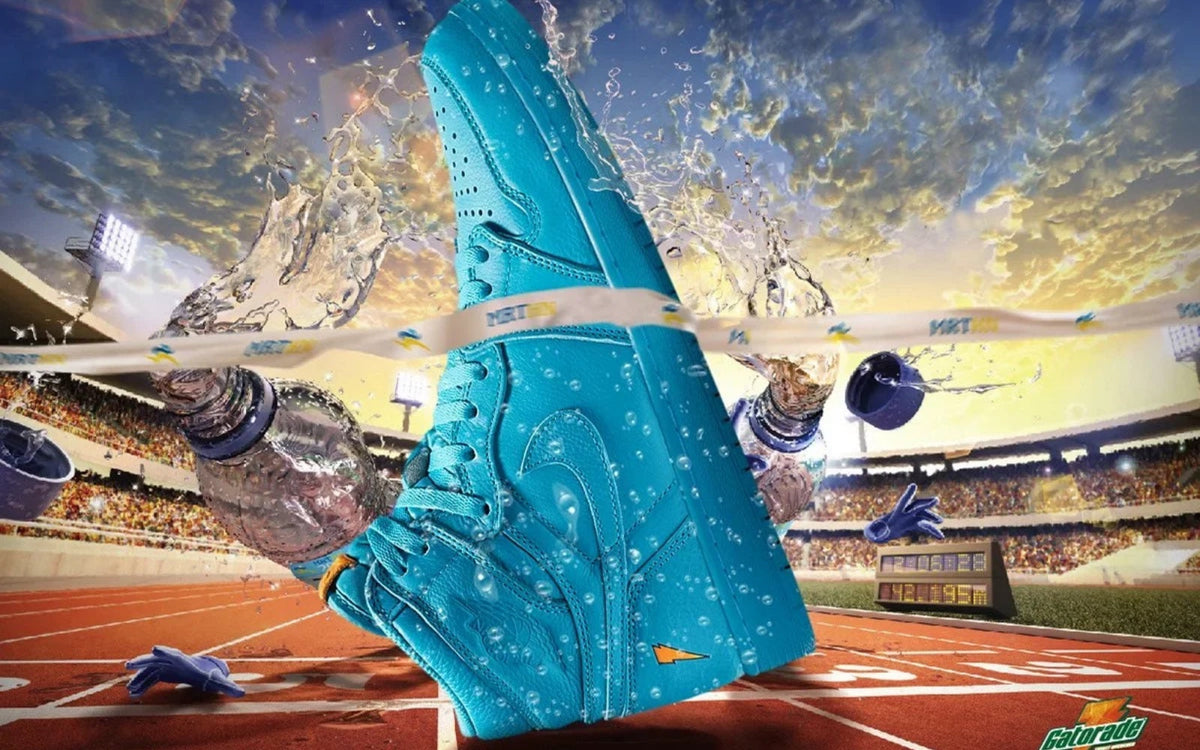
3D product renders win when your product doesn't physically exist yet, when you need shots a camera can't get, or when you need the same product in a lot of colors and scenes. A photoshoot wins when the selling point is real texture, food, people or a lived-in lifestyle feel. Plenty of brands end up using both.
I do both. I've shot lifestyle photography for brands and I build 3D work in Blender and Nomad Sculpt. So this isn't a pitch for one side. It's how I decide which tool fits the job.
What a 3D product render actually is
A 3D render is an image made from a digital model of your product. The model gets materials (plastic, metal, glass, fabric), lighting and a camera, and the software calculates the final image.
Done well, people can't tell it isn't a photo. Done badly, it looks like a video game from fifteen years ago. The difference is modeling accuracy, believable materials and lighting that matches the mood of the brand.
Same goes for animation: once the model exists, you can spin it, explode it into parts, drop it into a scene or loop it for social.

When 3D renders win
Your product isn't made yet
This is the big one. If you're pre-launch, crowdfunding, pitching retailers or building a site before inventory lands, there's nothing to photograph. A render lets you sell and market the product while the factory is still working.
You need shots a camera can't get
Cutaways that show what's inside. A product floating in space. Exploded views of every component. A sneaker made of chrome. A can splashing through a wave that would take a whole crew and a lot of cleanup to shoot for real. In 3D, impossible is just another setup.
You have a lot of colorways or variations
If you sell one product in a dozen colors, photographing every one means every one has to exist, be perfect and be shot the same way. In 3D, I build it once and swap the material. Every colorway gets identical lighting and angles.
You need consistency at scale
A product catalog shot over three different days with three different setups always shows it. Renders keep the same light, the same shadow and the same camera across every product page, ad and marketplace listing.
You want assets you can keep reusing
The model is an asset. Next season you can put it in a new scene, animate it for a launch, or render a new angle for a banner without booking anything. Photos are locked to the day they were shot.
When a photoshoot wins
Texture and material are the selling point
Leather grain, knit fabric, a hand-poured candle, a ceramic glaze with little imperfections. 3D can get close, but a good photo of a real material often carries more trust, and it's usually faster to get there.
Food and drink
Food can be rendered, but appetite appeal lives in real crumbs, steam, drips and condensation. If people need to want to eat it, I'd usually shoot it.
People, lifestyle and culture
If the image is about how the product fits into someone's life (a hand holding it, a crew wearing it, a kitchen it lives in), photography brings real moments that are hard to fake. Real faces, real places, real light.
Simple products you already have
If the product is on your desk and it's a straightforward shape, a well-lit studio shoot can be the quicker route. Building an accurate model from scratch takes time that a simple product doesn't always justify.
3D render vs photo: side-by-side comparison
Here's the render vs photo trade-off in one table. Neither side wins every row, which is why the answer depends on the product and where the images will run.
| 3D render | Photoshoot | |
|---|---|---|
| Does the product need to exist? | No. A model can be built from sketches, drawings or CAD files. | Yes. You need the finished, physical product. |
| New color, angle or scene later | Re-render from the same model. | Usually means another shoot. |
| Consistency across a catalog | Same light, shadow and camera every time. | Depends on the setup and the day. |
| Real texture, food and people | Possible, but harder to make convincing. | The camera's biggest strength. |
| Shots a camera can't get | Cutaways, exploded views, impossible locations. | Hard or impossible. |
| Reuse | The model is an asset you keep using. | Locked to what was shot that day. |
Hybrid approaches that work
You don't have to pick a side for the whole brand. Some combos I like:
Photo backgrounds, 3D product. Shoot the real environment, then composite a render of the product into it. Great when the product isn't ready but the location is.
Photos for lifestyle, renders for e-commerce. Real people and places on social and the homepage, clean consistent renders on product pages.
Renders for launch, photos after. Pre-launch campaign in 3D, then a shoot once inventory arrives to add real-world proof.
3D for motion, photos for stills. A photoshoot covers the static content while a 3D model handles the spins, reveals and product animations.
The key is planning it as one visual system, so the renders and photos feel like the same brand. Matching the lighting style and color grade across both goes a long way.
My Blender renders: treating a car like a product shoot
The clearest way to show what a render can do is my own work. My 3D car renders are a series I modeled, lit and rendered in Blender: a white Nissan GT-R, a blue R34 Skyline, a Supra, an S13 and a black coupe, staged in wet parking garages, a glass house, a gas station and a city crosswalk. None of those shoots happened in real life. There was no location scout, no permit and no waiting for rain.

Each scene is set up the way I'd light a product: one hero, one mood, and light doing most of the work. Wet floors double the car in the reflection, hard overhead lights cut through the dark, and softer fill keeps the body lines readable. Every render gets a film-style grade in Lightroom and is framed 4:5 for Instagram. The same approach works for a sneaker, a bottle or a gadget, and once the model exists, a new color or a new scene is a re-render, not a reshoot.

What I've done on both sides
At Gopuff, I built a lifestyle photography library, set up a three-style mood board to keep the look consistent, and made stop-motion animation. That's camera work: real products, real light. You can see it in the Gopuff photography and animation case study.
On the 3D side, Vandy the Pink's "GoreBurger" character went from sketches and variations to an animated build and a finished 3D render. That project is a good example of something that only exists because it was built digitally. See the GoreBurger case study.
What to send for an accurate 3D render
The better the inputs, the more accurate the render and the fewer revision rounds. Here's what helps most:
3D or CAD files. If an engineer or manufacturer already modeled the product, send whatever exports they can give you. Even a rough model saves a lot of time.
Dimensions and drawings. No CAD? Send technical drawings or measurements: height, width, depth, wall thickness, radii on curves, cap and label sizes.
Reference photos. If a prototype or sample exists, photograph it from the front, back, sides, top and bottom in even light, plus close-ups of seams, edges, logos and textures.
Material samples or specs. Matte or gloss? Brushed or polished metal? Frosted or clear glass? A physical sample or exact finish spec makes a big difference. Include color values for your brand colors.
Artwork and labels. Final packaging and label art as vector or high-res files, with dielines if you have them.
Shot list and use. Where the images will live (site, ads, Amazon listing, pitch deck) and the sizes and aspect ratios you need. Animation needs to be planned upfront too.
Mood references. Renders and photos you like, and what you like about each.
How to decide
Ask yourself four questions:
Does the product exist yet? If not, 3D.
Is the feeling about people, food or real texture? If yes, lean photo.
How many variations do you need, and will you need more later? The more variations and future reuse, the stronger the case for 3D.
Do you need motion? If spins, reveals or product animations are on the list, a 3D model pays for itself across stills and video.
If you answered "both" to a few of those, you're probably looking at a hybrid. That's normal. Most of the strongest product content I've seen mixes the two.
For more on how I handle 3D, motion and AI visuals, check the 3D, motion and AI page. If you need photography, video and social content, that lives on content and social.
FAQ
Are 3D product renders cheaper than a photoshoot?
It depends on the product and the number of images. A single simple product you already have can be quicker to shoot, while lots of colorways, impossible shots or ongoing reuse usually tilt toward 3D, since the model keeps working after the first round.
Can people tell a render from a photo?
Not when it's done well. Accurate modeling, realistic materials and good lighting are what make a render pass as a photo.
Can I use 3D renders on Amazon or other marketplaces?
Each marketplace sets its own image rules, and they change, so check the current requirements for your listing category before you plan the shots. Build the shot list around those rules from day one.
What software do you use for 3D product rendering?
I work in Blender for modeling, materials, lighting and rendering, and Nomad Sculpt for organic, sculpted forms. Stills get finished in Photoshop and animation in After Effects when a project needs it.
How long does a 3D product render take?
It depends mostly on how complex the product is and how good the reference files are. A clean CAD file and clear material specs move a project much faster than starting from a few phone photos.
Ready to see your product before it exists?
Whether you need renders, a shoot or a mix of both, I'll help you figure out the right approach and build the visuals to match. Send over what you have, even if it's just a sketch.
Need this done for your brand?
Start a projectMore from Design Dept.
How to Get Into Graphic Design in 2026 (From a Working Designer)
AI
Squarespace SEO Checklist: 12 Tips I Use on My Own Site (2026 Guide)
Process
Ad Creative That Converts: A Designer's Guide to Meta Ads (Static, Carousel and Video)
Creative Direction